EnergyAtlas Wiki
WebAPI
Quick Start Workflows Python WebAPI Library User Stories Wiki Guide
  • Web API Reference
  • Development Guide
  • Architecture
  • Core
  • Web Development
    • Overview
    • Execution Modes
    • GUI Jobs
    • GUI-less Jobs
    • Local File Access
    • Report Logs
  • Grasshopper Development
    • Components
    • Component Standards
    • Live Preview

WebAPI

EnergyAtlasWeb Job with Graphic User Interface (GUI)

The GUI Job system automatically generates a complete job page — input form, real-time log stream, and output display — from a pair of C# input/output classes decorated with [JobInput] / [JobOutput] attributes. No HTML or JavaScript is written per job.
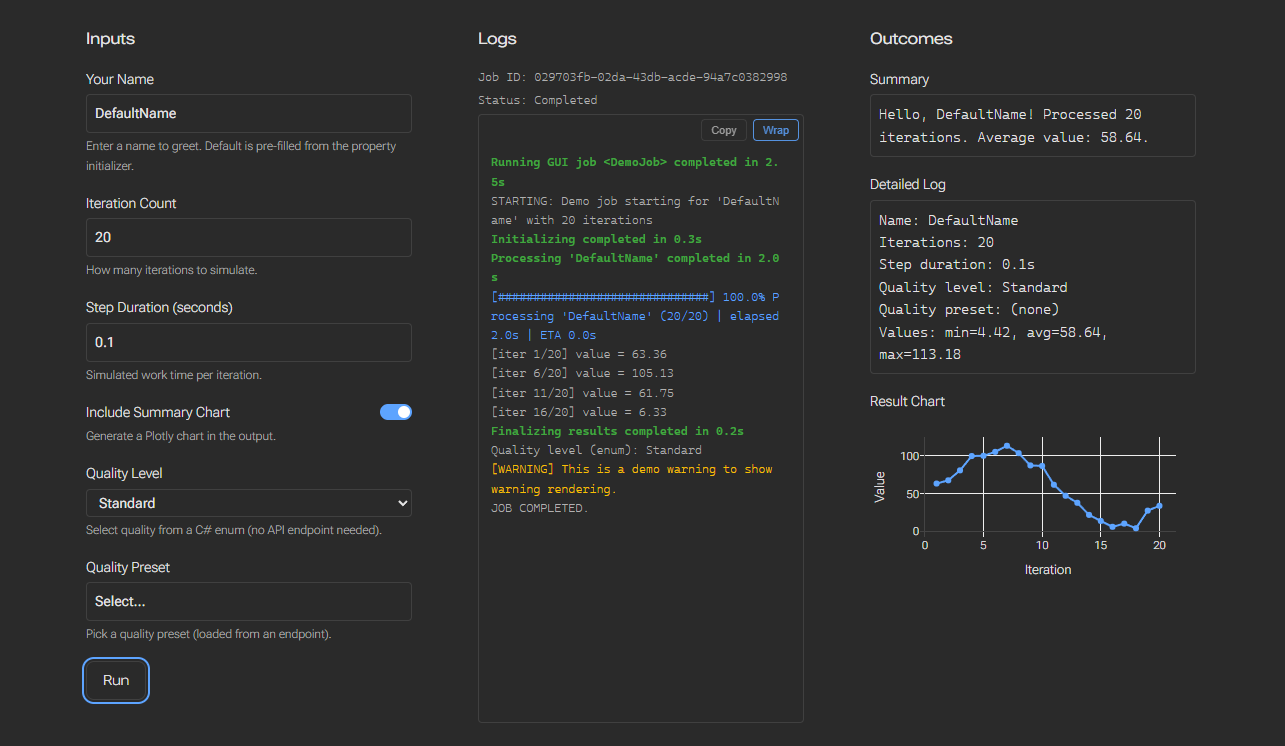
GUI Job page view

GUI Job Page layout

A GUI Job page has three sections, rendered in order (left to right on the page, top to bottom in the diagram below):
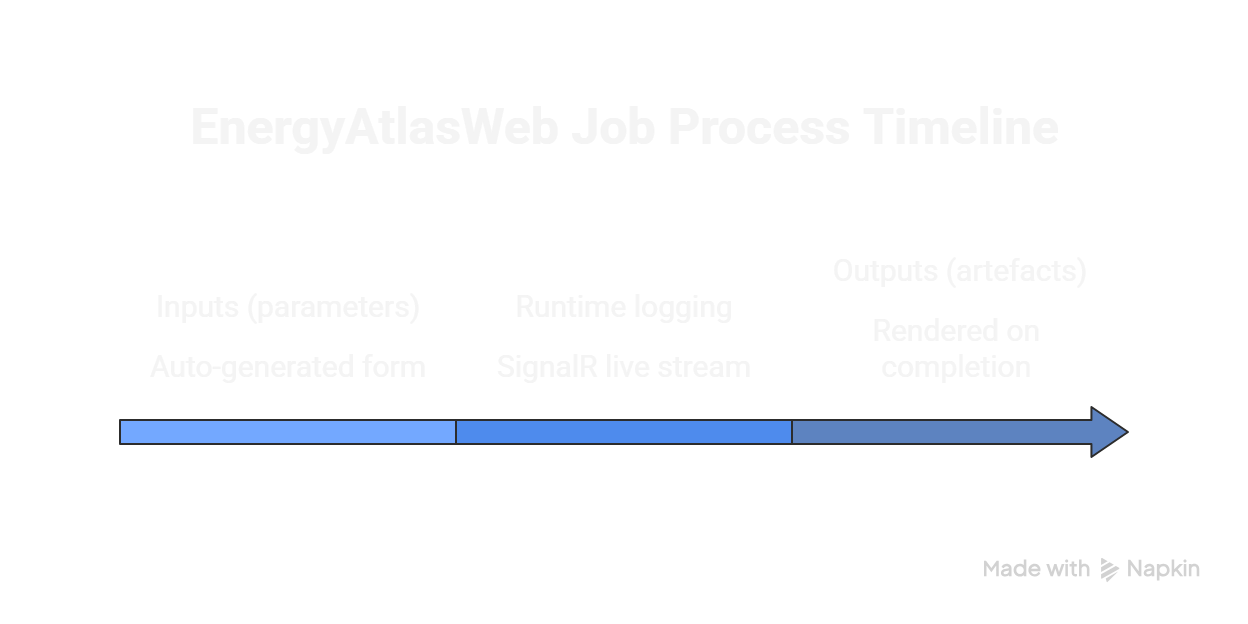
GUI Job page diagram

 1
 2
 3
 4
 5
 6
 7
 8
 9
10
11
12
13
14
15
16
17
Auto-generated form
┌──────────────────────────────────────────┐
│  Inputs (parameters)                     │
│  [Run]  ([Validate])                     │
└──────────────────────────────────────────┘

SignalR live stream
┌──────────────────────────────────────────┐
│  Runtime logging                         │
│  (progress bars, binary spinners, logs)  │
└──────────────────────────────────────────┘

Rendered on completion
┌──────────────────────────────────────────┐
│  Outputs (artefacts)                     │
│  (text, charts, download/reveal links)   │
└──────────────────────────────────────────┘

Architecture overview

 1
 2
 3
 4
 5
 6
 7
 8
 9
10
11
12
13
14
15
[JobInput] C# Attributes
on TInput class
        │
        ▼
GUIJobReflection
        │
        ▼
/api/guiJob/…/schema
        │
        ▼
Dynamic HTML Form
        ▲
        │
[JobOutput] C# Attributes
on TOutput class
  1. Developer defines TInput and TOutput classes with [JobInput] and [JobOutput] attributes.
  2. GUIJobReflection reads the attributes at startup and produces InputFieldDescriptor / OutputFieldDescriptor lists.
  3. GUIJobFactoryBase<TInput, TOutput> exposes them via the IGUIJobFactory interface.
  4. GET /api/guiJob/{jobName}/schema returns the descriptors as JSON.
  5. The frontend (jobRunner.js) renders the form based on a fixed base html and output widgets from those descriptors. In other words, all input, log, and output elements are generated on-the-fly with the same base HTML file.

1. Inputs (parameters)
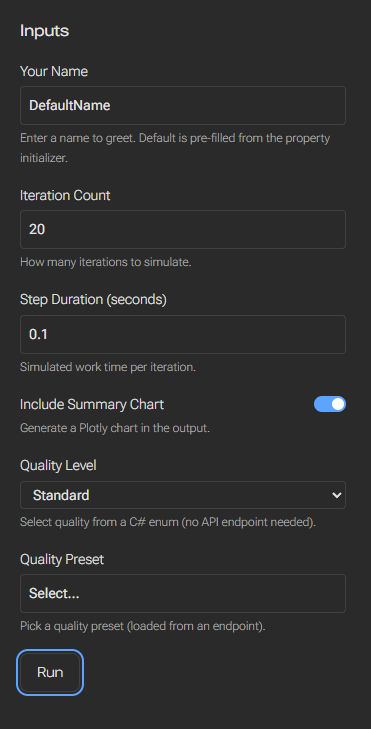
GUI Job page view: input

[JobInput] attribute

TODO: Hook API doc link in the future. EnergyAtlasWeb/Jobs/GUIJobs/GUIJobAttributes.cs

 1
 2
 3
 4
 5
 6
 7
 8
 9
10
11
12
13
[JobInput("Label text",
    // optional — inferred from property type
    FieldType     = InputFieldType.Text,
    HelperText    = "Shown below the field",
    Placeholder   = "Greyed-out hint",
    // for Picker / DataHubFile(s)
    SourceEndpoint = "/api/...",
    // for file fields
    AllowedExtensions = ".txt,.csv",
    // for Number / Int
    Min = 0, Max = 100, Step = 1
)]
public string MyParam { get; set; } = "default";

Supported InputFieldType enum values

Type C# type Rendered as
Text string Text input
Number double, float Numeric input (min/max/step)
Int int Integer input (min/max/step)
Boolean bool Checkbox
Enum any enum Dropdown (options from enum names)
Picker string Dropdown populated from SourceEndpoint
LocalFile string See Working with Local Files
LocalFiles string (JSON array) Multi-file picker
FolderPath string Directory picker
DataHubFile string DataHub single-file selector
DataHubFiles string DataHub multi-file selector

Default values

The DefaultValue in the descriptor is read from the property's initial value in the new TInput() default constructor.

The frontend pre-populates the form with these defaults.

2. Runtime logging
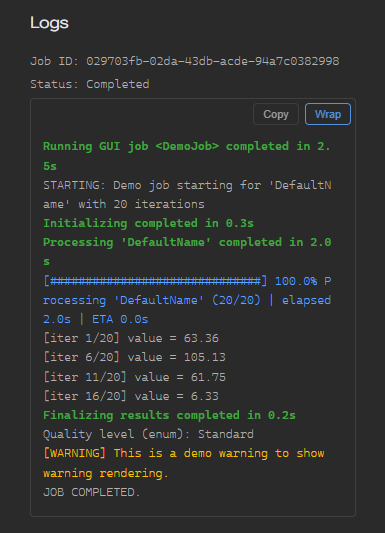
GUI Job page view: logs

During Run(), the job reports progress through IJobReporter (received as the second argument). All signal types are streamed to the frontend in real time via SignalR.

See SignalR Logging for the full reference on signal types, BinaryProgress, TQDM, and how each renders.

Quick summary of what's available inside Run():

 1
 2
 3
 4
 5
 6
 7
 8
 9
10
11
12
13
14
15
16
17
18
19
20
21
22
23
24
25
26
// Binary spinner (done/working)
using (var bp = new BinaryProgress(
    reporter, label: "Loading"))
{
    // ... work ...
}   // auto-completes on dispose

// Percentage progress bar
using (var tq = new TQDM(
    reporter, total: items.Count,
    label: "Processing"))
{
    foreach (var item in items)
    {
        Process(item);
        tq.Increment();
    }
}

// Free-form log lines
reporter.Report(JobSignal.Log(
    message: "Intermediate result: 42"));
reporter.Report(JobSignal.Warning(
    message: "File is unusually large"));
reporter.Report(JobSignal.Error(
    message: "Fatal: missing column"));

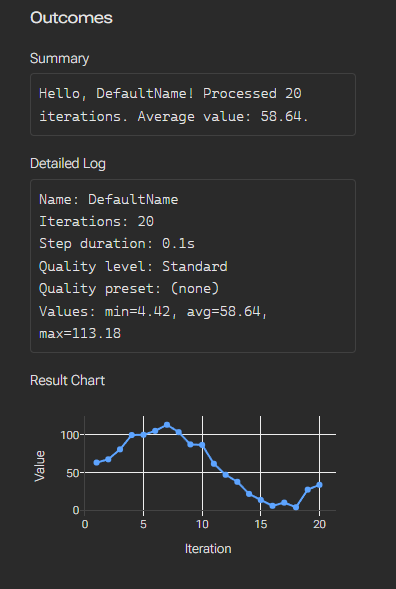
3. Outputs (artefacts)

GUI Job page view: output

[JobOutput] attribute

EnergyAtlasWeb/Jobs/GUIJobs/GUIJobAttributes.cs

1
2
3
4
5
[JobOutput("Label text",
    // optional — inferred from property type
    FieldType = OutputFieldType.Text
)]
public string Summary { get; set; }

Supported OutputFieldType values

Type C# type (auto-inferred) Rendered as
Text string Read-only text box
PlotlyChart PlotlyChartData Interactive Plotly chart (DataJson + LayoutJson)
File OutputFileReference or List<OutputFileReference> Download link or reveal-in-folder

OutputFileReference

EnergyAtlasWeb/Jobs/GUIJobs/GUIJobModels.cs

 1
 2
 3
 4
 5
 6
 7
 8
 9
10
11
12
13
public class OutputFileReference
{
    // link text
    public string DisplayName { get; set; }
    // file path (on-disk outputs only)
    public string Reference { get; set; }    
    // key for download API (download outputs only)    
    public string ArtifactKey { get; set; }      
    // MIME type (download outputs only)
    public string ContentType { get; set; }      
    // true -> open folder; false -> download via api
    public bool IsOnDisk { get; set; } = true; 
}
  • On-disk (IsOnDisk = true): The file exists at Reference. The frontend shows a folder icon and calls POST /api/guiJob/revealInFolder?path=... to open the containing folder.
  • Download (IsOnDisk = false): No file on disk. The job registers the blob in the artifact sink during Run(), sets ArtifactKey, and the frontend links to GET /api/guiJob/{jobId}/download/{artifactKey}.

See Working with Local Files for the full artifact sink design and file access differences across Execution Modes.

Factory and registration

GUIJobFactoryBase<TInput, TOutput>

EnergyAtlasWeb/Jobs/GUIJobs/GUIJobFactoryBase.cs

Abstract generic base that handles all the plumbing:

 1
 2
 3
 4
 5
 6
 7
 8
 9
10
11
12
13
14
15
16
17
18
public abstract class GUIJobFactoryBase<TInput, TOutput> : IGUIJobFactory
    where TInput : class, new()
    where TOutput : class, new()
{
    public abstract string JobName { get; }
    public abstract string JobDescription { get; }

    // Reflection-derived descriptors (populated in constructor)
    public IReadOnlyList<InputFieldDescriptor> InputFields { get; }
    public IReadOnlyList<OutputFieldDescriptor> OutputFields { get; }

    protected abstract IGUIJob<TInput, TOutput> CreateJob();
    protected virtual IGUIJobValidator<TInput>? CreateValidator() => null;

    // IGUIJobFactory implementation
    public string Execute(string inputJson, IJobReporter reporter);
    public GUIJobValidationResult? Validate(string inputJson);
}

Execute(...) deserializes JSON → TInput, calls CreateJob().Run(input, reporter), serializes TOutput → JSON.

Input Output Interfaces IGUIJob<TInput, TOutput>

EnergyAtlasWeb/Jobs/GUIJobs/GUIJob.cs

1
2
3
4
5
6
public interface IGUIJob<TInput, TOutput>
    where TInput : class, new()
    where TOutput : class, new()
{
    TOutput Run(TInput input, IJobReporter reporter);
}

Dependency Injection (DI) registration

EnergyAtlasWeb/Program.cs

1
2
3
4
builder.Services.AddSingleton<IGUIJobFactory, DemoJobFactory>();
builder.Services.AddSingleton<IGUIJobFactory, DemoFileJobFactory>();
builder.Services.AddSingleton<IGUIJobFactory, TiledLidarVoxelizationGUIJobFactory>();
builder.Services.AddSingleton<GUIJobRegistry>();  // collects all IGUIJobFactory

GUIJobRegistry receives IEnumerable<IGUIJobFactory> and builds a lookup by JobName. The job automatically appears in GET /api/guiJob and gets a generated page.

Note: this is a standard .NET Dependency Injection (DI) behavior.

IEnumerable<T> collects all registered T, instantiates each singleton, and injects them as a collection.

Optional: input validation

Override CreateValidator() to return an IGUIJobValidator<TInput>:

 1
 2
 3
 4
 5
 6
 7
 8
 9
10
11
12
public interface IGUIJobValidator<TInput>
{
    GUIJobValidationResult Validate(TInput input);
}

public sealed class GUIJobValidationResult
{
    public bool Ok => Errors.Count == 0;
    public List<string> Errors { get; set; }
    public List<string> Warnings { get; set; }
    public string Summary { get; set; }
}

When present, the frontend shows a Validate button. The user can pre-check their inputs before running.

Minimal code template

 1
 2
 3
 4
 5
 6
 7
 8
 9
10
11
12
13
14
15
16
17
18
19
20
21
22
23
24
25
26
27
28
29
30
31
32
33
34
35
36
37
38
39
40
41
42
43
44
45
46
47
48
49
50
51
52
53
54
55
56
57
58
59
60
61
62
63
64
65
66
67
68
69
70
71
72
73
74
75
76
77
78
79
80
81
82
83
84
85
// ─── Input ──────────────────────────────────
public class MyJobInput
{
    [JobInput("Input File (.csv)",
        AllowedExtensions = ".csv")]
    public string InputFilePath { get; set; } = "";

    [JobInput("Threshold",
        Min = 0, Max = 100, Step = 0.1)]
    public double Threshold { get; set; } = 50.0;

    [JobInput("Mode")]
    public MyMode Mode { get; set; } = MyMode.Fast;
}

public enum MyMode { Fast, Accurate }

// ─── Output ─────────────────────────────────
public class MyJobOutput
{
    [JobOutput("Summary")]
    public string Summary { get; set; } = "";

    [JobOutput("Result Chart")]
    public PlotlyChartData Chart { get; set; }

    [JobOutput("Report")]
    public OutputFileReference Report { get; set; }

    [JobOutput("Output Directory")]
    public OutputFileReference OutputDir { get; set; }
}

// ─── Factory ────────────────────────────────
public class MyJobFactory
    : GUIJobFactoryBase<MyJobInput, MyJobOutput>
{
    public override string JobName => "MyJob";
    public override string JobDescription
        => "Processes CSV data and produces a report.";

    protected override IGUIJob<MyJobInput, MyJobOutput>
        CreateJob() => new MyJob();
}

// ─── Job ────────────────────────────────────
public class MyJob : IGUIJob<MyJobInput, MyJobOutput>
{
    public MyJobOutput Run(MyJobInput input, IJobReporter reporter)
    {
        reporter.Report(JobSignal.Start(message: "MyJob starting"));

        // Read input, do work, report progress ...

        // Register a download artifact (no file on disk)
        var reportBytes = Encoding.UTF8.GetBytes("Report content here");
        GUIJobRunContext.Current?.ArtifactSink?.Register(
            "report", "report.txt", "text/plain", reportBytes);

        // Write an on-disk output
        var outDir = Path.Combine(Path.GetTempPath(), "guijob_output", Guid.NewGuid().ToString());
        Directory.CreateDirectory(outDir);
        var outPath = Path.Combine(outDir, "output.csv");
        File.WriteAllText(outPath, "col1,col2\n1,2\n");

        return new MyJobOutput
        {
            Summary = "Processed 1000 rows.",
            Chart = new PlotlyChartData { DataJson = "[...]", LayoutJson = "{...}" },
            Report = new OutputFileReference
            {
                DisplayName = "report.txt",
                ArtifactKey = "report",
                ContentType = "text/plain",
                IsOnDisk = false
            },
            OutputDir = new OutputFileReference
            {
                DisplayName = "output.csv",
                Reference = outPath,
                IsOnDisk = true
            }
        };
    }
}

Registration checklist

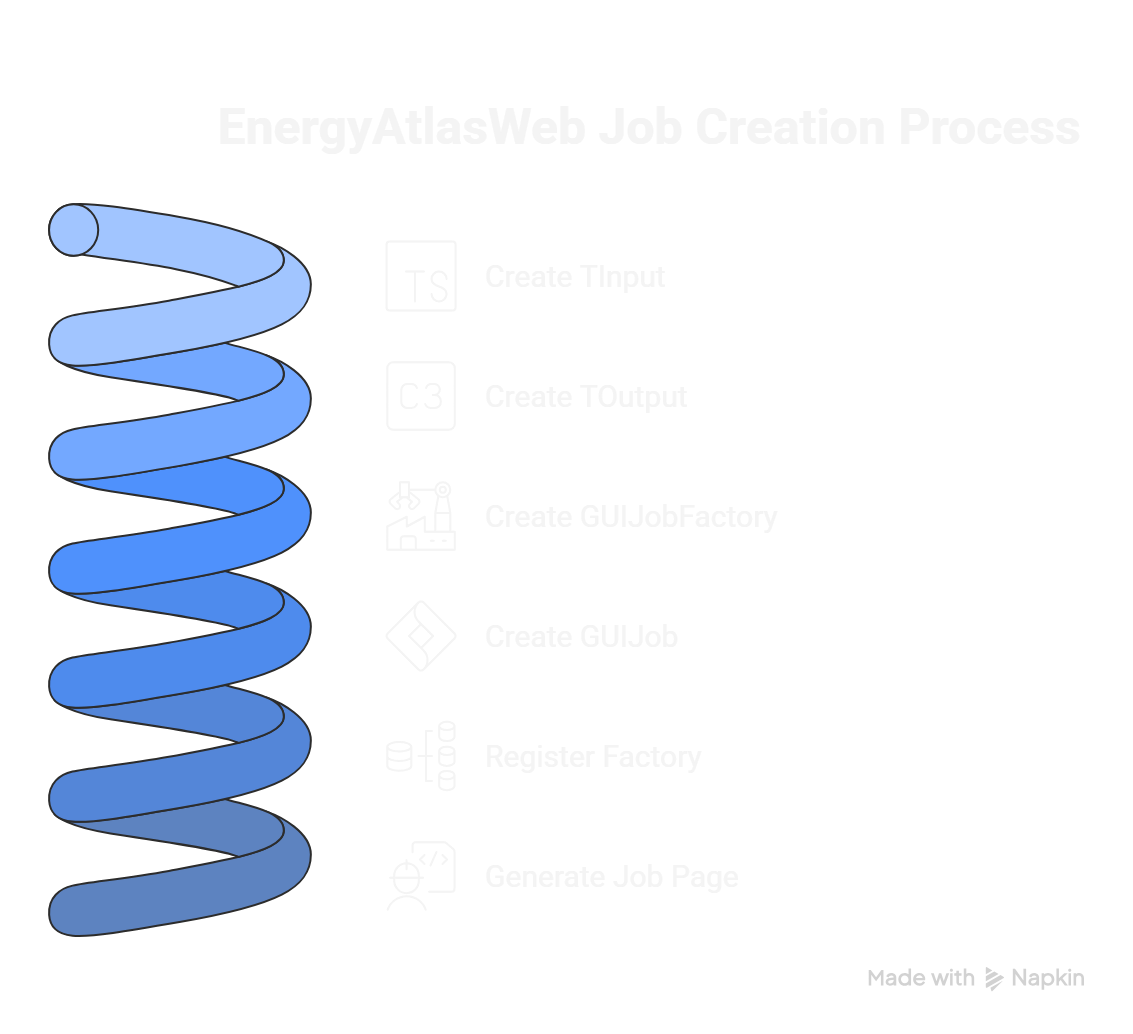
  1. Create TInput with [JobInput] attributes on every property.
  2. Create TOutput with [JobOutput] attributes on every property.
  3. Create a factory extending GUIJobFactoryBase<TInput, TOutput>.
  4. Create the job implementing IGUIJob<TInput, TOutput>.
  5. Register in Program.cs: builder.Services.AddSingleton<IGUIJobFactory, MyJobFactory>();.
  6. The job page is generated automatically.
GUI Job creation process

See also

  • EnergyAtlasWeb Job (Single-Click, No GUI) — one-click jobs (no inputs/outputs)
  • Working with Local Files — file picking, artifact sink, execution mode differences
  • Execution Modes — browser vs local mode
  • SignalR Logging — reporter, signal types, progress bars
Execution Modes Previous GUI-less Jobs Next

Last page update GMT-04:00 05:00 Jul 19 2026
Last website update GMT-04:00 05:00 Jul 19 2026

Found an issue on this page? Please open an issue on GitHub.

On this page

  • EnergyAtlasWeb Job with Graphic User Interface (GUI)
    • GUI Job Page layout
    • Architecture overview
    • 1. Inputs (parameters)
      • [JobInput] attribute
      • Supported InputFieldType enum values
      • Default values
    • 2. Runtime logging
    • 3. Outputs (artefacts)
      • [JobOutput] attribute
      • Supported OutputFieldType values
      • OutputFileReference
    • Factory and registration
      • GUIJobFactoryBase<TInput, TOutput>
      • Input Output Interfaces IGUIJob<TInput, TOutput>
      • Dependency Injection (DI) registration
    • Optional: input validation
    • Minimal code template
      • Registration checklist
    • See also

WIP EnergyAtlas Wiki

EnergyAtlas Wiki is still under active development. Thank you for your patience while we improve the documentation. If you have any questions, please contact us.